
Gangs Wars: Pixel Shooter RP
Description
Gangs Wars: Pixel Shooter RP is a pixel-themed open-world FPS and sandbox game developed by DUCKY LTD. Its setting is a stylized block city filled with missions, vehicles, enemies, police pursuits, and activities.
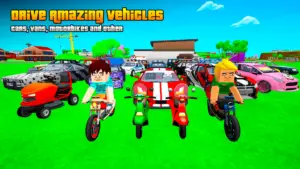
Rather than concentrating exclusively on shooting, the game combines several genres into one package. Driving and exploration sit alongside gunplay, while ragdoll physics add a playful element to encounters and movement.
The result is an experience that feels less like a conventional mission-by-mission shooter and more like a digital playground where players can decide how they want to spend their time.
A Block-Style Open World to Explore
One of the game’s main attractions is its open-world structure. The city gives players room to move beyond a single objective and explore different parts of the environment.
The block-based art style keeps the visuals deliberately simple and distinctive. Characters, buildings, vehicles, and surroundings follow the same stylized aesthetic, creating a world that feels playful even when the action becomes intense.
Exploration also has a practical purpose. Missions and activities are spread throughout the game world, encouraging players to become familiar with the environment rather than simply following a narrow path.
Story and Mafia-Themed Missions
Gangs Wars: Pixel Shooter RP includes a storyline centered around a character who becomes involved in conflicts connected to the city’s criminal world. One of the central objectives involves rescuing a friend from the mafia boss Tony Cubeface.
Story missions provide direction for players who prefer structured gameplay. They can also act as a starting point for learning the game’s shooting, driving, and exploration mechanics.
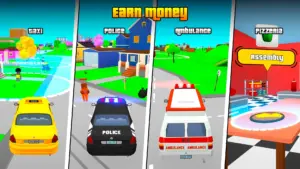
The missions are not restricted to one type of activity. Depending on the situation, players may find themselves moving through the city, fighting opponents, escaping from authorities, or completing objectives connected to the game’s wider sandbox environment.
Shooting and FPS Gameplay
At its core, Gangs Wars: Pixel Shooter RP is an FPS, so shooting is an important part of the experience.
Combat takes place within the game’s blocky environments, giving players opportunities to combine movement and weapon-based action. The physics system adds another layer to encounters, with ragdoll effects contributing to the game’s deliberately exaggerated style.
The shooting mechanics are therefore presented as part of a broader sandbox rather than as a standalone competitive shooter. Players can move between combat, driving, exploration, and other activities instead of remaining focused on gunfights throughout the entire game.
Physics-Based Ragdoll Fun
Physics is one of the features that gives Gangs Wars its personality.
Characters and objects can react in exaggerated ways, producing the unpredictable moments commonly associated with sandbox games. Ragdoll behavior can make encounters feel less rigid and contributes to the humorous side of the game.
This physics-driven approach works particularly well with the game’s pixel presentation. Instead of aiming for photorealistic action, the game embraces exaggerated movement and playful chaos.
Police Chases and Wanted-Level Gameplay
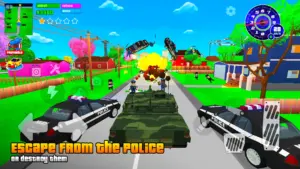
Criminal activities have consequences in Gangs Wars: Pixel Shooter RP. As players commit crimes, their wanted level can increase, eventually bringing police attention into the gameplay.
Police pursuits add an element of unpredictability to exploration. A player may begin an activity voluntarily but suddenly find themselves trying to escape pursuing authorities.
Getting caught does not necessarily end the entire experience. The game’s store description explains that players can pay a fine after being arrested and then return to the action.
Images
Download links
How to install Gangs Wars: Pixel Shooter RP APK?
1.Open the downloaded APK file
Locate the Gangs Wars: Pixel Shooter RP APK in your device’s Downloads folder or notification panel and tap it.
2.Tap “Install”
Select the Install option when the installation screen appears.
3.Follow the on-screen instructions
Wait for the installation to finish, then follow any remaining prompts to complete the setup.
Related apps



EXCLUSIVE GAMES
Most viewed Games
Best Rated Games


