
Asphalt 8 – Car Racing Game
Description
Asphalt 8 – Car Racing Game: A High-Speed World of Cars, Motorbikes, and Stunts
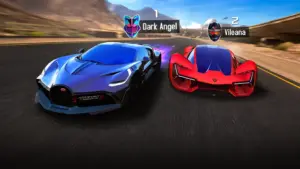
Asphalt 8 – Car Racing Game delivers an arcade-style racing experience centered on speed, spectacular stunts, competitive events, and a huge collection of high-performance vehicles. Developed as part of Gameloft’s Asphalt series, the game takes players through a wide range of locations while giving them plenty of opportunities to race, drift, jump, customize vehicles, and compete against other drivers.
The game goes beyond ordinary circuit racing. Ramps can launch vehicles into the air, corners can become opportunities for dramatic drifts, and multiplayer events can turn a familiar track into a fierce competition. With hundreds of cars and motorcycles to collect, there is also a strong progression element for players who enjoy building a personal garage.
Asphalt 8 is a fast-paced racing game designed around accessible controls and exaggerated arcade action. Instead of concentrating exclusively on realistic driving physics, it emphasizes spectacular moments and energetic competition.
Players can choose from a large collection of licensed vehicles, enter different racing events, explore varied environments, and develop their driving skills. The experience combines solo challenges with multiplayer competition, giving players different ways to enjoy the game.
Race Across a Diverse Collection of Tracks
Discover Different Racing Environments
One of the highlights of Asphalt 8 is its variety of locations. The racing experience can take you from the dry roads of the Nevada Desert to the busy atmosphere of Tokyo.
The changing environments help make each race feel visually different. Instead of spending the entire game on similar-looking circuits, players can experience a collection of distinctive landscapes and racing settings.
Learn Every Corner
Different tracks demand different approaches. Long straights create opportunities for maximum acceleration, while tight corners reward drivers who know how to control their vehicles.
Learning the layout of a course can help you anticipate turns, choose better racing lines, and prepare for jumps or obstacles before they arrive.
Build a Garage of 300+ Vehicles
Collect Cars and Motorcycles
Asphalt 8 gives vehicle collectors plenty to pursue, with 300+ cars and motorcycles available across its extensive lineup.
The garage includes high-performance machines associated with famous automotive manufacturers such as Lamborghini, Bugatti, and Porsche. Motorcycles add another option for players who want to experience the tracks from a different perspective.
Discover Special Vehicles
Some vehicles can make your collection particularly distinctive. Special-edition machines provide additional goals for dedicated players who enjoy collecting unusual or desirable rides.
Perform 360-Degree Spins and Barrel Rolls
When your vehicle leaves the ground, you can perform maneuvers such as 360-degree spins and barrel rolls.
Successful stunts add another layer of skill to the driving experience. Timing your launch and controlling your vehicle in mid-air can turn a simple jump into an impressive racing maneuver.
Land and Keep Your Momentum
Performing a stunt is only useful if you can recover properly. A poorly controlled landing can cost speed, while a successful landing allows you to continue the race without losing momentum.
This makes airborne sections both visually exciting and mechanically important.
Master Drifting on the Asphalt
Drifting is another major part of the driving experience. Tight corners can become opportunities to slide through turns while maintaining your speed.
Learning to control a drift takes practice. Players need to balance the vehicle’s movement through the corner while preparing to accelerate away from the turn.
When mastered, drifting can make difficult sections of a track feel smoother and more rewarding.
Images


Download links
How to install Asphalt 8 - Car Racing Game APK?
1.Open the downloaded APK file
Locate the Asphalt 8 - Car Racing Game APK in your device’s Downloads folder or notification panel and tap it.
2.Tap “Install”
Select the Install option when the installation screen appears.
3.Follow the on-screen instructions
Wait for the installation to finish, then follow any remaining prompts to complete the setup.
Related apps




EXCLUSIVE GAMES
Most viewed Games
Best Rated Games


