Battle Cars: Nitro PvP Shooter
Description
Battle Cars: Nitro PvP Shooter – Where Speed Meets Firepower
What happens when a racing game collides with a multiplayer shooter?
You get Battle Cars: Nitro PvP Shooter, a fast-moving vehicle combat game where driving ability, weapons, customization, and tactical decisions all come together. Instead of racing toward a finish line, players enter competitive arenas where cars are built for battle and every turn can become an opportunity to attack.
Set against a stylized cyberpunk and post-apocalyptic backdrop, the game transforms the familiar automobile into a combat machine. Players can collect different vehicles, equip them with weapons, customize their appearance, and compete in PvP battles.
The concept is straightforward: drive, attack, survive, and improve.
But mastering the battlefield requires considerably more than simply pressing the accelerator.
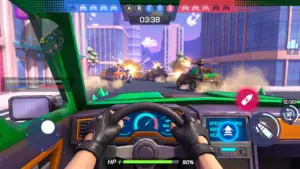
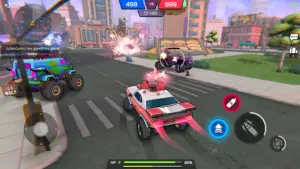
Battle Cars: Nitro PvP Shooter is a competitive multiplayer vehicle shooter from TinyBytes. It combines elements of racing, third-person combat, vehicle customization, and team-based PvP into short, action-heavy matches.
The game is designed around cars that function as both transportation and weapons platforms. Players aren’t merely trying to reach a destination—they are attempting to outmaneuver opponents while using an arsenal of firearms and close-range weapons.
That creates a very different experience from conventional racing games.
The road becomes an arena.
Your vehicle becomes your weapon.
And your driving skills become part of your combat strategy.
More Than a Racing Game
Traditional racing games reward speed, cornering, and precise driving.
Traditional shooters reward aim, positioning, and weapon management.
Battle Cars combines these ideas.
A fast vehicle can help you escape an attack, chase down an opponent, or reach an objective. At the same time, your weapons determine how effectively you can pressure or eliminate rival cars.
This creates a constant relationship between movement and combat.
You might be lining up a shot one moment and desperately steering away from incoming fire the next. A successful player needs to think like both a driver and a fighter.
Build Your Own Battle Car
One of the game’s central progression systems revolves around building a garage of combat-ready vehicles.
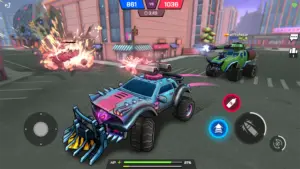
The current listing advertises 15+ customizable cars, including buggies, armored vehicles, cyber trucks, sports cars, and monster trucks.
This variety means that players aren’t locked into a single type of vehicle.
A lightweight buggy can suggest a very different approach from a heavy monster truck. A sports-style battle car may appeal to players who prefer speed, while an armored vehicle can suit someone who enjoys a more aggressive confrontation.
The important point is that your garage becomes part of your strategic toolkit.
Customize More Than Your Car’s Appearance
Vehicle customization isn’t limited to choosing a different car.
The game features patterns, camouflage, and decals that allow players to create a distinctive visual identity.
This gives the garage a personal element.
Your battle car can become recognizable through its appearance while also being equipped to suit your preferred combat style.
Collecting vehicles, upgrading favorites, and experimenting with different combinations gives the progression system a purpose beyond simply unlocking cosmetic items.
Turn Cars Into Weapons
The defining feature of Battle Cars is its arsenal.
The current game listing advertises more than 12 guns and 12 collision or melee weapons.
That means the vehicle you select is only one part of your combat setup.
Players can equip their machines with weapons such as machine guns, missiles, sniper rifles, rocket launchers, and flamethrowers.
Each type of weapon can encourage a different approach.
Machine Guns
Machine guns provide a natural option for sustained attacks. They can keep pressure on an opponent while you maneuver around the battlefield.
Missiles and Rockets
Explosive weapons introduce another level of threat. Timing and positioning become particularly important when attempting to land a powerful attack.
Sniper Rifles
Long-range weapons can reward players who prefer to maintain distance and look for carefully chosen opportunities to strike.
Flamethrowers
Close-range weapons create a completely different style of combat. Getting near an opponent becomes dangerous for both sides, making movement and timing especially important.
Collision Weapons
Not every attack has to come from a gun.
Battle Cars also features collision and melee-style weapons, giving players the opportunity to use their vehicle itself as an offensive tool.
That adds another dimension to the classic idea of a car battle.
Fast-Paced PvP Matches
Battle Cars is designed around competitive multiplayer combat.
Players can enter different PvP formats, including Free-for-All and team-oriented modes. The game also includes Capture the Flag and Domination-style objectives, giving players reasons to do more than simply chase eliminations.
Free-for-All Combat
In a Free-for-All environment, every opponent represents a potential threat.
There are no teammates to rely on, so awareness becomes critical. You need to understand where other vehicles are positioned while deciding which battles are worth taking.
Sometimes attacking is the right move.
Sometimes surviving is more important.
Team-Based 4v4 Battles
Team modes change the entire rhythm of combat.
Instead of focusing exclusively on your own survival, you have to consider what your teammates are doing. A coordinated group can attack together, defend an objective, or create opportunities for another player.
The game includes several battlefield roles, including Speedsters, Attackers, Suppliers, Tanks, and Defenders.
This allows teams to approach battles with complementary strengths.
Images
Download links
How to install Battle Cars: Nitro PvP Shooter APK?
1.Open the downloaded APK file
Locate the Battle Cars: Nitro PvP Shooter APK in your device’s Downloads folder or notification panel and tap it.
2.Tap “Install”
Select the Install option when the installation screen appears.
3.Follow the on-screen instructions
Wait for the installation to finish, then follow any remaining prompts to complete the setup.
Related apps






EXCLUSIVE GAMES
Most viewed Games
Best Rated Games


