
Spider Fighter 2
Description
Spider Fighter 2 – Complete Guide to the 3D Superhero Fighting Game
Spider Fighter 2 is a 3D action brawler that puts players behind the mask of a spider-inspired superhero and sends them into dangerous city streets filled with criminals. Developed by Starplay FZCO, the game combines straightforward mobile controls with fast melee combat, superhero abilities, character progression, and boss encounters.
The game’s main appeal is its simple premise: enter the city, confront criminal gangs, improve your hero, and become powerful enough to take on tougher enemies.
Spider Fighter 2 is designed as a single-player action and fighting game set in a stylized 3D city.
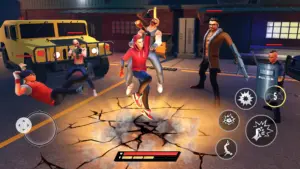
Instead of focusing on traditional one-on-one fighting matches, the game uses a beat-’em-up structure. Players move through areas occupied by groups of enemies and use their superhero’s attacks and special abilities to clear the streets.
A Superhero Story Set in a Crime-Filled City
The game’s premise revolves around a city overrun by gangs and powerful criminal bosses.
The authorities are unable to deal with the threat, leaving the spider-themed hero to confront the criminals directly. This gives the player a straightforward mission: defeat the gangs, protect civilians, and work toward eliminating the people controlling the city’s criminal underworld.
Rather than spending much time on complicated storytelling, the game uses the superhero premise to move players quickly into the action.
Fight Through the Streets
The city functions as the main arena for combat.
Players encounter groups of enemies throughout different locations and must defeat them before moving forward. This creates a classic beat-’em-up rhythm in which one encounter leads naturally into the next.
The changing surroundings also help prevent the combat from feeling like a series of battles taking place in exactly the same location.
3D Combat Built for Mobile
One of Spider Fighter 2’s defining characteristics is its three-dimensional presentation.
The hero and enemies are represented in 3D, while the environments provide space for movement during fights. The official listing describes the game as using a new 3D fighting engine and emphasizes its action-oriented presentation.
Melee Combat and Superhero Abilities
Combat revolves primarily around direct confrontation.
Players can use melee attacks to fight enemies at close range, while special powers provide additional ways to damage opponents or control an encounter. The official game description also mentions ranged combat and unlockable abilities.
This creates a useful distinction between ordinary attacks and more powerful techniques.
Combine Different Attacks
Rather than relying on one move repeatedly, players can develop a broader collection of combat options as they progress.
New abilities allow the hero to approach groups of enemies in different ways. This is particularly useful when stronger opponents and bosses begin appearing.
The progression system therefore has a direct impact on combat: the more abilities players unlock, the more options they have during a fight.
Unlock New Combos and Skills
Character progression is an important part of Spider Fighter 2.
As players earn experience and advance, they can unlock additional abilities and improve their hero. This provides a sense of growth throughout the campaign.
Instead of beginning with every powerful technique available, the player gradually develops a more capable superhero.
Active and Passive Improvements
The game includes both active abilities and passive perks.
Active skills can be used during combat when players need additional offensive power. Passive improvements can strengthen the character more consistently and help shape the way the hero performs.
This gives players a basic progression choice: improve immediate combat options or invest in advantages that remain useful throughout encounters.
Images


Download links
How to install Spider Fighter 2 APK?
1.Open the downloaded APK file
Locate the Spider Fighter 2 APK in your device’s Downloads folder or notification panel and tap it.
2.Tap “Install”
Select the Install option when the installation screen appears.
3.Follow the on-screen instructions
Wait for the installation to finish, then follow any remaining prompts to complete the setup.
Related apps






EXCLUSIVE GAMES
Most viewed Games
Best Rated Games


