
Farlight 84
Description
Farlight 84: A Complete Guide to Fast-Paced Hero Shooter Gameplay
Farlight 84 is a multiplayer shooter that takes the familiar battle royale formula and gives it a more mobile-friendly, movement-focused identity. Instead of relying solely on traditional gunfights, the game combines squad combat with agile traversal, specialized heroes, tactical Buddy companions, fast looting, and a battlefield designed around vertical movement.
The result is an experience where players are encouraged to keep moving, experiment with different approaches, and make quick decisions when an enemy squad appears.
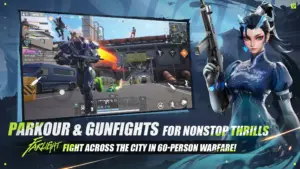
60-Player Squad Battles
Fight as a Trio
Farlight 84 places players into squads of three, creating opportunities for coordinated attacks and defensive plays.
With multiple squads operating in the same match, players need to pay attention to more than the opponent directly in front of them. Another team can arrive unexpectedly, turn an existing firefight into a three-way battle, or attack while a squad is recovering from an earlier engagement.
This makes situational awareness especially important.
Teamwork Changes the Outcome
A coordinated trio can divide responsibilities and cover different angles.
One player might pressure an opponent while another takes a wider route. A third teammate can provide support or watch for another squad approaching from behind.
Communication becomes particularly useful when fights become chaotic because quick information can help teammates decide whether to push, retreat, rotate, or hold their position.
Movement Is a Major Part of Combat
Run, Slide, Climb and Wall-Run
Farlight 84 places unusual emphasis on mobility.
Players can move through the environment using actions such as running, sliding, climbing, and wall-running. These mechanics make movement more than a way of getting from one location to another.
They can directly affect how a firefight develops.
A player who changes elevation quickly may force an opponent to adjust their aim. A slide can help break a predictable movement pattern, while a wall-run can provide access to a different route.
Use Ziplines to Change Position
Ziplines provide another way to move through the battlefield.
They can help squads cross difficult terrain, reach elevated areas, or relocate when the current position becomes dangerous.
A mobility-focused player can therefore think about the battlefield in terms of routes rather than simply looking for the nearest road or doorway.
The Rat Cannon
One of the game’s more unusual movement options is the Rat Cannon, a launch device capable of sending players across the map.
It adds another layer to rotations because a squad can potentially use it to make a rapid transition between areas.
Movement tools such as this also create opportunities for unexpected attacks. Instead of approaching an enemy from the direction they expect, players can use the environment to change the angle of engagement.
Vertical Battlefields
High Ground Matters
Farlight 84’s environments aren’t limited to flat ground combat.
Tall structures, rooftops, bridges, elevated positions, and other vertical spaces give players additional options for positioning.
High ground can provide better visibility and create useful firing angles, but holding an elevated position can also make a squad easier to notice.
The best players therefore need to balance the advantages of elevation against the attention it can attract.
Think in Three Dimensions
The vertical nature of the game changes how players should approach encounters.
Instead of checking only what is directly ahead, players need to consider:
- Rooftops.
- Elevated platforms.
- Bridges.
- Lower routes.
- Ziplines.
- Alternative entry points.
- Possible escape paths.
This creates more possibilities during combat and prevents many encounters from becoming predictable.
Images
Download links
How to install Farlight 84 APK?
1.Open the downloaded APK file
Locate the Farlight 84 APK in your device’s Downloads folder or notification panel and tap it.
2.Tap “Install”
Select the Install option when the installation screen appears.
3.Follow the on-screen instructions
Wait for the installation to finish, then follow any remaining prompts to complete the setup.
Related apps







EXCLUSIVE GAMES
Most viewed Games
Best Rated Games


